Online M3U playlist editor
Load an M3U link, a file or a provider login. Rename, sort, group and hide streams in bulk. Get one clean M3U link back for any player.
It runs in your browser, so there is nothing to install. Playlists can hold up to 5 million streams.
No card needed.
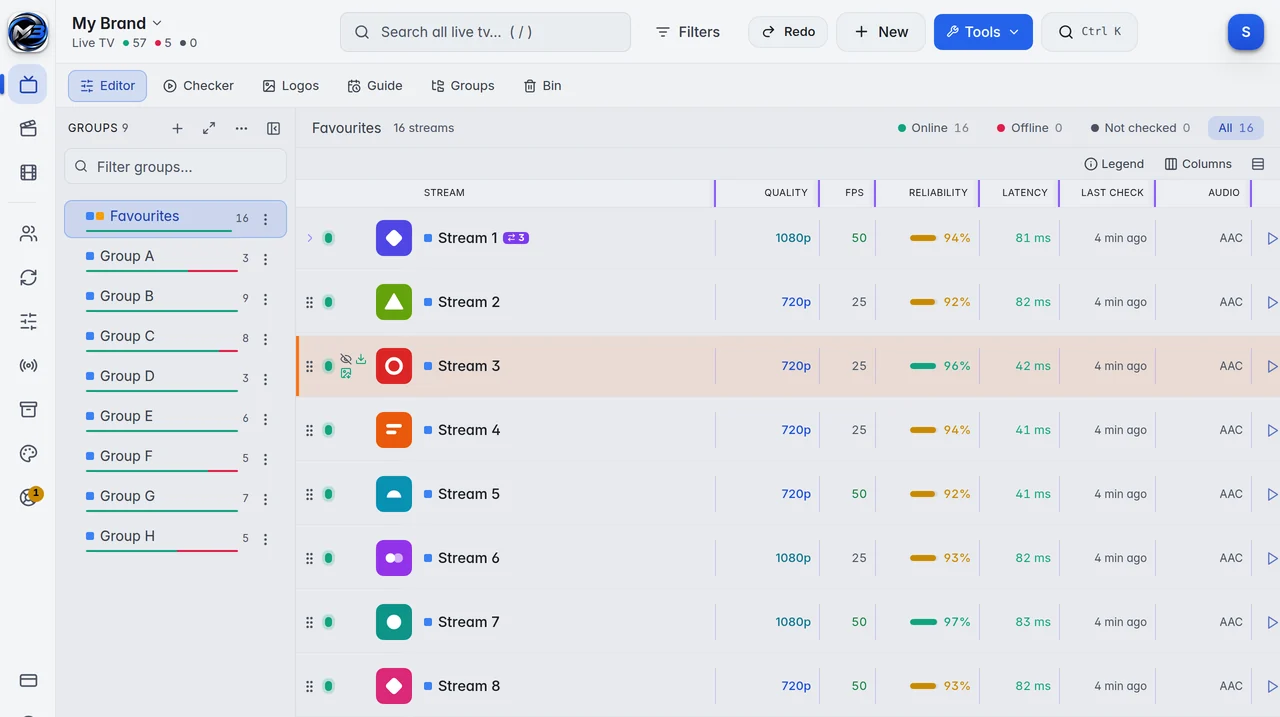
What you can do with a playlist
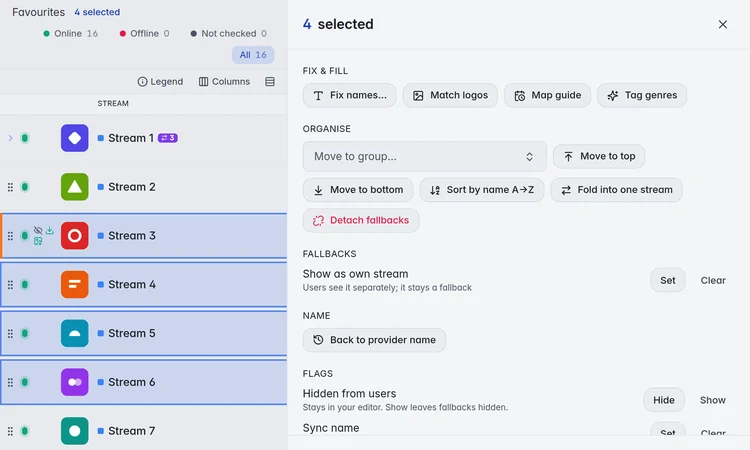
Pick one stream or thousands, then change all of them at once. Every bulk tool shows you the result before it saves.
- Rename in bulk: fix names, search and replace, add a prefix or a suffix, change upper and lower case.
- Sort and renumber streams and groups, or drag them into place.
- Hide what you do not need. Deleted streams go to the bin first, so a wrong click costs nothing.
- Remove duplicates by address or by name.
- Match logos and guide (EPG) ids for the whole list.
- Undo the last 20 changes, kept for 7 days.
Your edits stay when the provider updates the list
M3UTool reads your provider again about every four hours. New streams arrive and dropped ones leave on their own.
Your names, logos, numbers, groups, guide ids and hidden streams stay as you set them. Only a stream you mark with Sync name follows the name your provider gives it.
You can also copy your edits to a second playlist from the same provider, so you clean up a list only once.
How to edit an M3U playlist
- Add your provider login (server, username and password), an M3U link or an .m3u file as a new playlist.
- Pick the groups you want to keep.
- Run Fix names, Match logos and Map guide on the whole list, then change what is left by hand.
- Copy your M3U link and guide link into any player, or give your users the M3UTool app.
Built for big lists
One playlist can hold up to 5 million streams, and one account up to 20 playlists. Search, filters and bulk tools work on the whole list, not only on what is on screen.
When you want to know which links still work, the link checker tests them for you, up to 100,000 links a day.
Prices
Personal is 1 user (you) for €10 a year. Pro is 10 to 400 users, from €15 a year. Every plan has every feature, and you can try them all free for 14 days first.
| Users | Price a year | Link checks a day |
|---|---|---|
| Free trial | 14 days free, no card | 5,000 |
| 1 (you) | €10 | 10,000 |
| 10 | €15 | 10,000 |
| 20 | €20 | 10,000 |
| 30 | €25 | 10,000 |
| 50 | €35 | 10,000 |
| 100 | €60 | 20,000 |
| 150 | €80 | 30,000 |
| 250 | €120 | 50,000 |
| 400 | €170 | 100,000 |
Prices are for 2 playlists of up to 1 million streams each. More playlists: 5 for €10, 10 for €25, 20 for €60 more a year. Bigger playlists: 2 million streams for €2, 5 million streams for €5 more a year per playlist. Every plan has every feature. Self-hosted M3UTool comes with plans from €40 a year.
M3UTool includes no content. You bring your own playlists.
Questions
Can I edit an M3U file without a link?
Yes. Upload an .m3u, .m3u8 or .txt file. A file has no source to update from, so it stays as you uploaded it until you add a provider login for it.
Which players can use the edited playlist?
Any player that opens an M3U link or a login with server, username and password, for example TiviMate, OTT Navigator or VLC. Your users can also use the M3UTool apps.
Do I lose my edits when the provider changes the list?
No. Names, logos, numbers, groups and hidden streams stay as you set them. New streams from the provider are added, and you decide what happens to them.
Can I undo a change?
Yes. The last 20 changes of a playlist can be undone for 7 days. Deleted streams also wait in the bin until you empty it.
Is there a free M3U editor?
M3UTool is not free, but you can try every feature for 14 days with no card. After that, plans start at €10 a year.
Does M3UTool include streams?
No. M3UTool includes no content. You bring your own playlists.
Try it on your own playlist
14-day free trial, no card. Every feature is on from the first day.
Start free trial