Use your M3U playlist and guide in TiviMate
TiviMate is a player app for Android TV. It plays an M3U playlist and shows the guide (EPG) next to it. M3UTool gives every user both links in one window, ready to copy and send.
Other player apps that take an M3U link and a guide link work the same way.
No card needed.
Before you start
TiviMate is a player only. It includes no content: you add your own playlists. Its makers say it is made for Android TV and the remote, and is not optimised for phones and tablets.
On a phone, a tablet or a computer, your users can use another player app or the M3UTool apps.
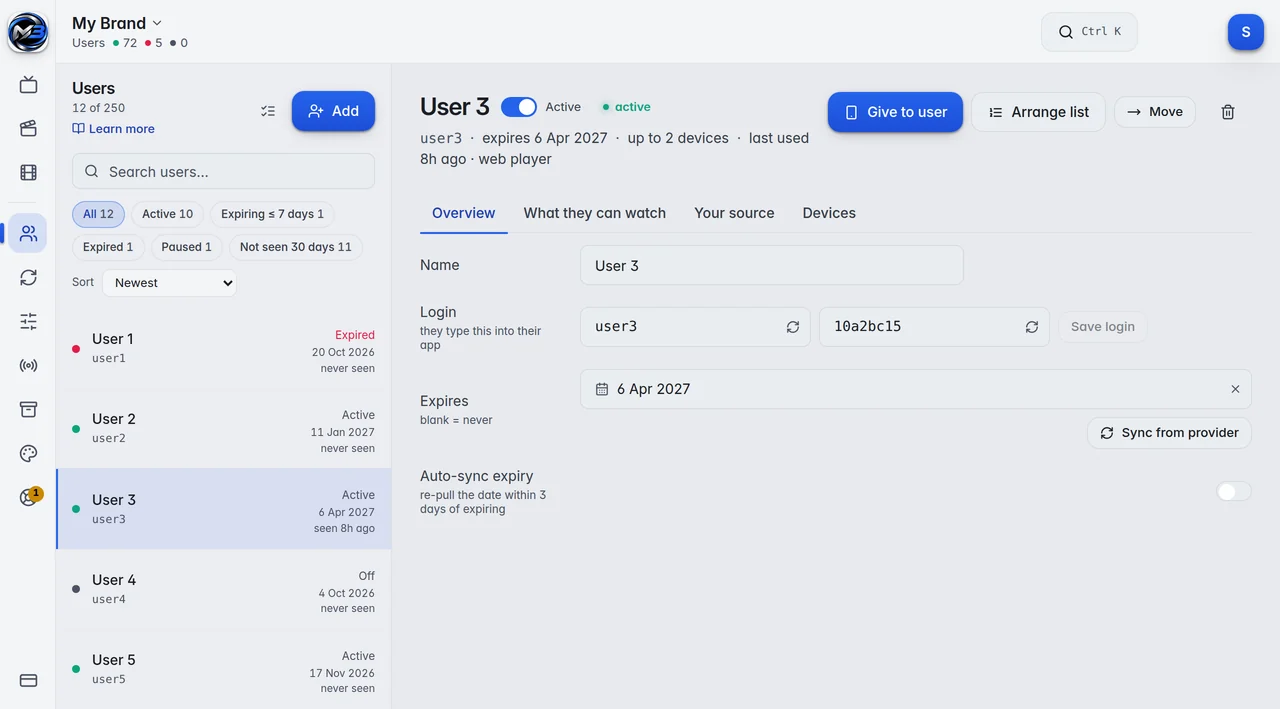
In M3UTool every user has an M3U link and a Guide link (EPG) of their own. If you only watch yourself, add yourself as the one user.
Where to find the M3U link and the EPG URL
Both links are in one window in M3UTool:
- In Users, click the user in the list.
- Click Give to user.
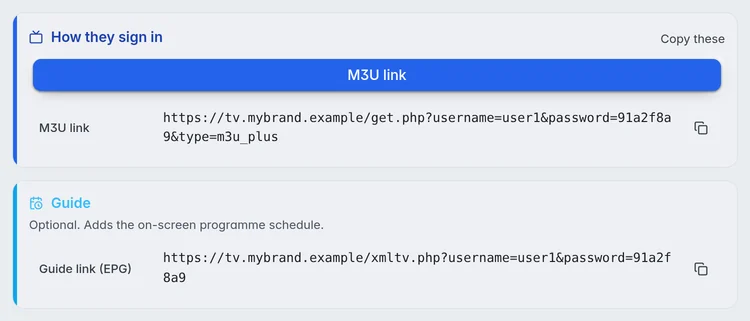
- Under How they sign in, choose M3U link.
- Copy the M3U link and the Guide link (EPG) with the copy icons, or click Copy these, and send them to the user.
Add the M3U playlist and EPG in TiviMate
In the player, the user adds the two links. In general words:
- Add a new playlist.
- Paste the M3U link.
- If the app asks for a guide, EPG or XMLTV address, paste the Guide link.
- Let the app load the playlist and the guide.
When TiviMate shows no guide or the EPG is not updating
Most blank or old guides have one of these causes:
- The stream has no guide id in M3UTool, or its guide has no programmes ahead. The editor flags those streams, and Map guide fixes most of them. More in EPG matching.
- The player has not loaded the new guide yet. Players load the guide on their own schedule. Refresh the guide in the player to load it straight away.
- The guide file is packed (gzip) and the player does not open it. Turn Compressed (gzip) off in the guide file settings of the playlist.
- The guide is hours off on one stream only. Set a time shift for that stream in M3UTool. If it is off on every stream, check the time zone of the TV or box first.
What works in TiviMate, and what stays in the M3UTool apps
TiviMate shows the playlist the user may see: their groups, their own order and their end date apply there too. A few things stay in the M3UTool apps:
- There is no activation code. The user pastes the links.
- Messages you send to all users do not show in other players.
- Your branding does not show. The player looks the way its maker designed it.
- Backup links show right after their stream as "Stream (Backup 1)" and so on. The user switches by hand. In the M3UTool apps the switch is automatic: how backup links work.
- Other players are not counted toward Max devices and are not listed with the user’s devices. Your provider’s own connection limit still applies.
Want your name and logo on the player instead? The branded player app runs on Android TV, Android phones, Windows and in the browser. More in Use other players in our guide.
Prices
Personal is 1 user (you) for €10 a year. Pro is 10 to 400 users, from €15 a year. Every plan has every feature, and you can try them all free for 14 days first.
| Users | Price a year | Link checks a day |
|---|---|---|
| Free trial | 14 days free, no card | 5,000 |
| 1 (you) | €10 | 10,000 |
| 10 | €15 | 10,000 |
| 20 | €20 | 10,000 |
| 30 | €25 | 10,000 |
| 50 | €35 | 10,000 |
| 100 | €60 | 20,000 |
| 150 | €80 | 30,000 |
| 250 | €120 | 50,000 |
| 400 | €170 | 100,000 |
Prices are for 2 playlists of up to 1 million streams each. More playlists: 5 for €10, 10 for €25, 20 for €60 more a year. Bigger playlists: 2 million streams for €2, 5 million streams for €5 more a year per playlist. Every plan has every feature. Self-hosted M3UTool comes with plans from €40 a year.
M3UTool includes no content. You bring your own playlists.
Questions
Where do I find the EPG URL for TiviMate?
In M3UTool, open Users, click the user and click Give to user. The Guide link (EPG) is in the same window as the M3U link.
Does TiviMate work on a phone?
Its makers say it is made for Android TV and is not optimised for phones or tablets. On a phone, use another player app or the M3UTool app.
Why does TiviMate show no guide?
Most often the stream has no guide id, or the player has not loaded the new guide yet. Check the stream in M3UTool, then refresh the guide in the player. If the guide file is packed as gzip, try it unpacked.
Do backup links work in TiviMate?
The M3U link lists each backup right after its stream, as "Stream (Backup 1)" and so on, and the user switches by hand. In the M3UTool apps the switch is automatic.
Does TiviMate count toward the device limit?
No. Other players are not counted toward Max devices and are not listed. Your provider’s own connection limit still applies.
Does M3UTool include streams?
No. M3UTool includes no content. You bring your own playlists.
Try it on your own playlist
14-day free trial, no card. Every feature is on from the first day.
Start free trial