User management for your playlists
Give each user their own login and links. Choose which groups they see, how many devices may watch at once and when access ends.
Plans cover 1 to 400 users.
No card needed.
What every user gets
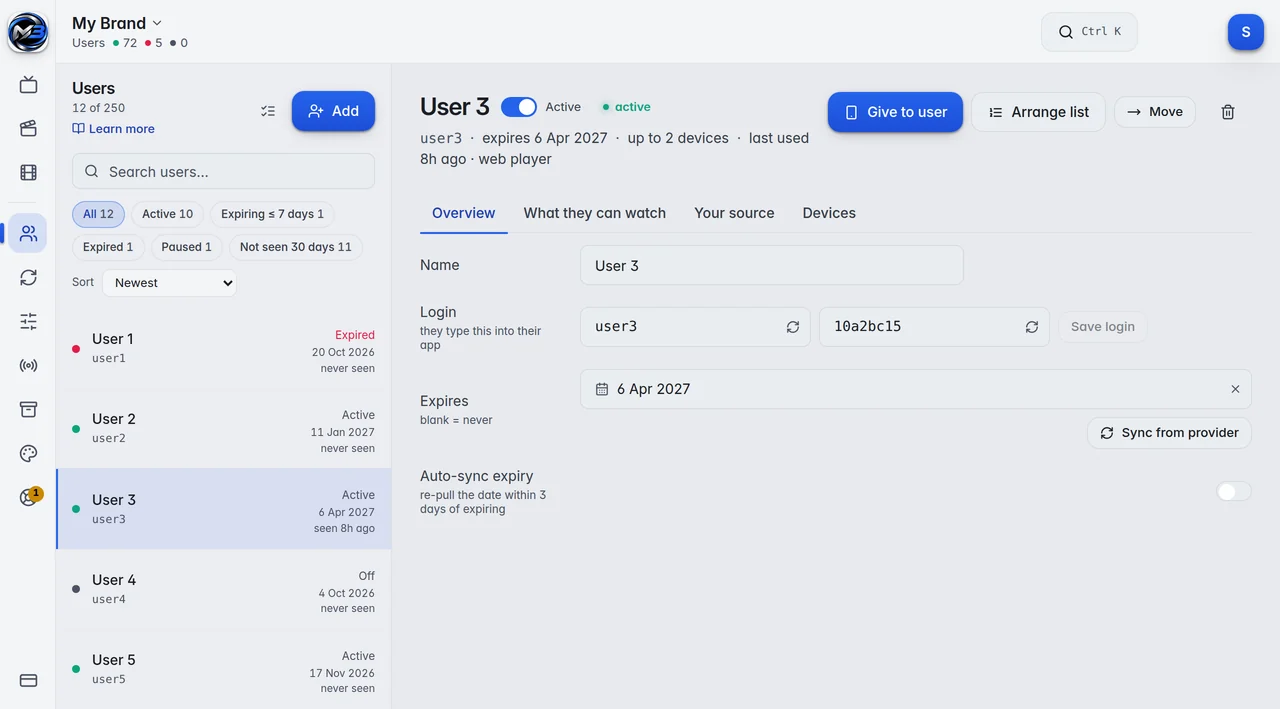
You add a user with a name only you see, a username and a password. They get everything in one window, ready to copy and send:
- A login with server, username and password, an M3U link and a guide link.
- An activation code for the M3UTool apps.
- A page of their own with their end date, their devices, their code and a message box.
- Their own order: they can hide, rename and move groups for themselves without changing anyone else’s list.
Devices
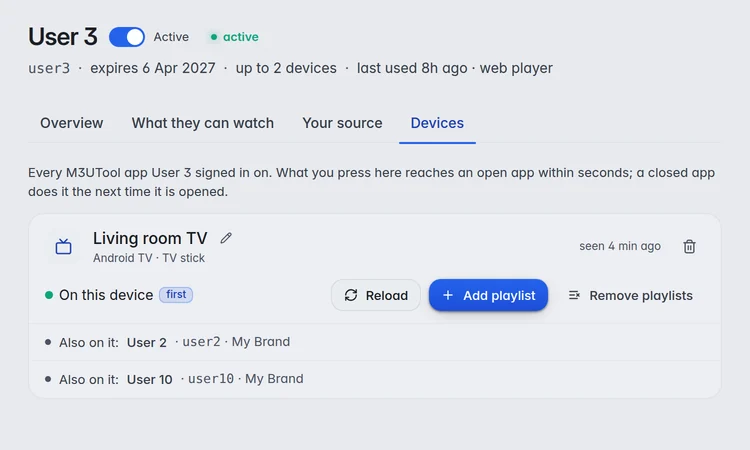
Max devices is how many M3UTool apps may watch at the same time, not how many are installed. Devices on the same home connection count as one.
A device frees its place about 90 seconds after it stops playing. The Devices tab lists every M3UTool app a user signed in on and when it was last seen, and you can reload an app or remove it from there.
Players from other makers are not limited by this and are not listed. Your provider’s own connection limit still applies to everyone.
Groups and bouquets
Choose for each user which groups they see. Save a set as a bouquet and give it to many users. Change the bouquet once, and everyone on it gets the change.
A user whose ticks you change by hand gets their own set, and the bouquet stays as it was.
End dates and messages
Set an end date or leave it open. Every user shows as Active, Expiring (7 days or less) or Expired. When the end date passes, access stops in every app and every link until you renew.
You can take the end date from the user’s provider login, and have M3UTool check it again 3 days before it runs out.
Answer support requests from the editor, or send all users one short message. It shows in the M3UTool apps and on their own page.
Prices
Personal is 1 user (you) for €10 a year. Pro is 10 to 400 users, from €15 a year. Every plan has every feature, and you can try them all free for 14 days first.
| Users | Price a year | Link checks a day |
|---|---|---|
| Free trial | 14 days free, no card | 5,000 |
| 1 (you) | €10 | 10,000 |
| 10 | €15 | 10,000 |
| 20 | €20 | 10,000 |
| 30 | €25 | 10,000 |
| 50 | €35 | 10,000 |
| 100 | €60 | 20,000 |
| 150 | €80 | 30,000 |
| 250 | €120 | 50,000 |
| 400 | €170 | 100,000 |
Prices are for 2 playlists of up to 1 million streams each. More playlists: 5 for €10, 10 for €25, 20 for €60 more a year. Bigger playlists: 2 million streams for €2, 5 million streams for €5 more a year per playlist. Every plan has every feature. Self-hosted M3UTool comes with plans from €40 a year.
M3UTool includes no content. You bring your own playlists.
Questions
How many users can I add?
1 on Personal, and 10 to 400 on Pro. The table above shows the price of every step. Self-hosted M3UTool, with plans from €40 a year, runs on your own Windows PC or Linux server without the user limit.
What counts as a device?
An M3UTool app or the web player that is playing right now. Devices on the same home connection count as one. Other players are not counted.
Can a user see only some groups?
Yes. Tick the groups for each user, or give them a bouquet that you can change for everyone at once.
What happens when the end date passes?
Access stops in every app and every link. Set a new end date and it works again.
Can users keep their own player app?
Yes. Any player that takes an M3U link or a login with server, username and password works. Those players do not count toward the device limit.
Can I send a message to all users?
Yes. One short message shows in the M3UTool apps and on every user’s own page.
Try it on your own playlist
14-day free trial, no card. Every feature is on from the first day.
Start free trial